

For many newcomers, GitHub seems wrapped in technical jargon and unfamiliar workflows. That’s where this GitHub for beginners guide comes in. By comparing coding concepts to everyday financial activities—like opening a bank account or checking your balance—you’ll learn GitHub the easy, relatable way. No experience required.
1. Repository: Your Bank Account
Bank Analogy: A bank account holds your money and tracks all transactions (deposits, withdrawals, and balances).
GitHub Equivalent: A repository (or “repo”) is like a bank account for your code. It stores all your project files and tracks every change made to them.
Git Commands:
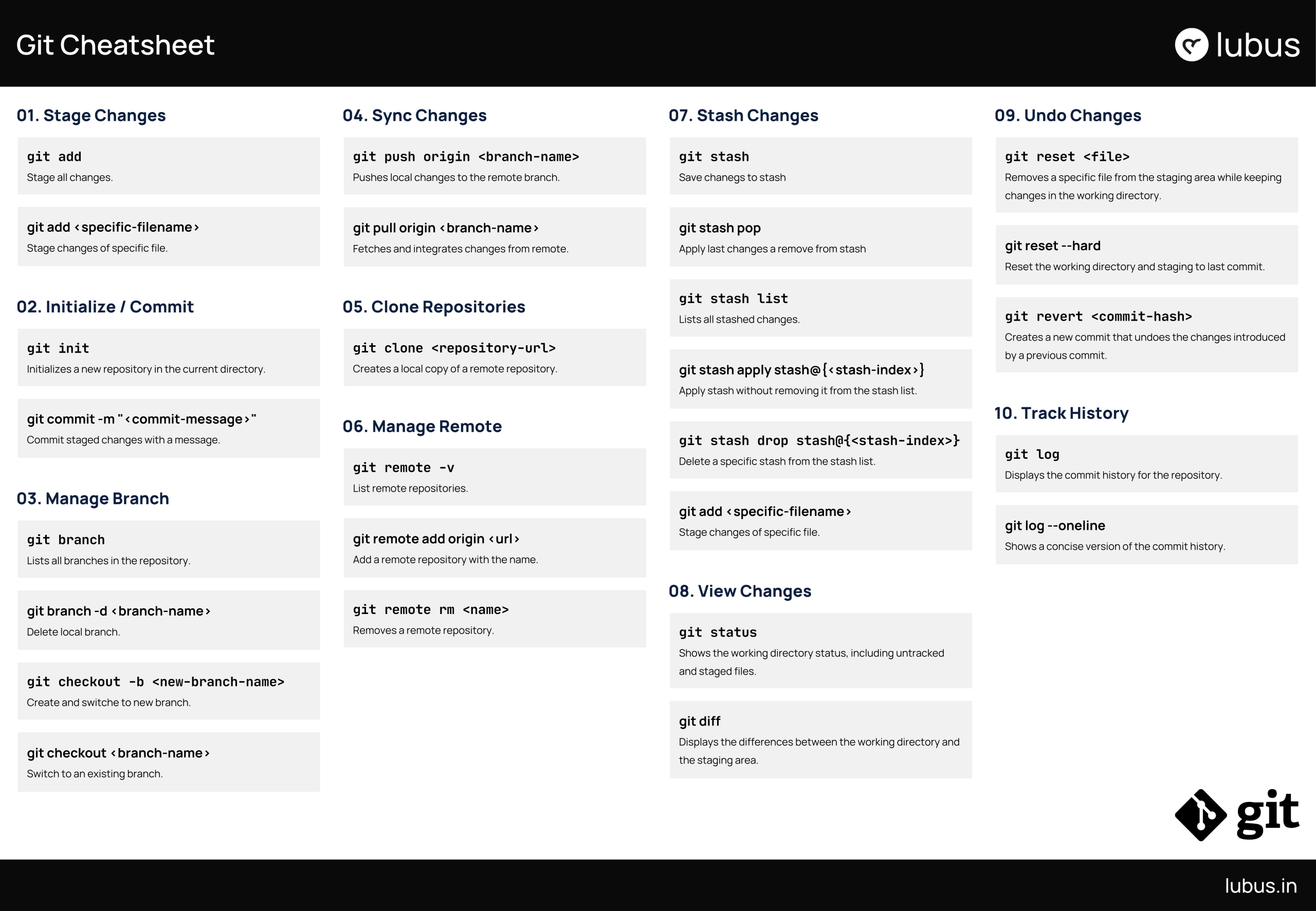
git init? Initializing a new repository in the current directory.git clone <repo_url>? Creates a local copy of a remote repository..git remote add origin <repo_url>? Adds a remote repository with the nameoriginpointing to the specified URL.
Example: Just as you open a savings account for a specific purpose, you create a repository for a particular project.
2. Commits: Transactions
Bank Analogy: Every time you deposit or withdraw money, it?s recorded as a transaction in your bank statement.
GitHub Equivalent: A commit is like a transaction. It records a change you?ve made to your code and includes a message explaining what was changed.
Git Commands:
git add <file>? Adds a specific file to the staging area.git commit -m "Message"? Commits the staged changes with a descriptive message..git log? Checks the commit history.
Example: If you fix a bug or add a new feature, you “commit” the change, just like depositing money into your account.
3. Conventional Commits: Standardized Transaction Records
Bank Analogy: Banks maintain structured transaction records. Each transaction has a category (deposit, withdrawal, loan payment) and a description (who, what, and why). This structure helps customers and bank managers track account activities easily.
GitHub Equivalent: In Git, Conventional Commits ensure that commit messages follow a structured format, making them clear, searchable, and automation-friendly.
Conventional Commit Format:
<type>(optional scope): <description>

[optional body]

[optional footer]
type? Describes the purpose of the commit (e.g.,feat,fix,docs).scope? (Optional) Specifies which part of the project was affected.description? A concise summary of the change.body? (Optional) Additional details about the change.footer? (Optional) Metadata such as issue references or breaking changes.
Types of Conventional Commits
| Commit Type | Description |
feat | Adding a new feature |
fix | Fixing a bug |
docs | Updating documentation |
style | Code style improvements (no logic change) |
refactor | Code restructuring (no functional change) |
perf | Performance improvements |
test | Adding or modifying tests |
ci | Continuous integration setup updates |
chore | Maintenance tasks (dependencies, build scripts) |
Example:
git commit -m "feat(auth): add social login"
git commit -m "fix(ui): resolve button alignment issue"
git commit -m "docs(readme): update installation steps"
3. Branches: Different Accounts for Different Purposes
Bank Analogy: You might have separate accounts for savings, investments, or daily expenses.
GitHub Equivalent: Branches are like separate accounts for different purposes. The main branch is your primary account (like a checking account), while other branches are used for testing new features or fixing bugs.
Git Commands:
git branch? Lists all branches in the repository, highlighting the current branch.git checkout <branch-name>orgit switch <branch-name>? Creates and switches to a new branch..git branch -d <branch-name>? Deletes a specified branch locally.
Example: You create a feature-login branch to work on a login feature without affecting the main codebase.
4. Pull Requests: Loan Applications
Bank Analogy: When you apply for a loan, the bank reviews your application and approves or rejects it.
GitHub Equivalent: A pull request (PR) is like a loan application. It?s a request to merge changes from one branch into another. Team members review the changes, suggest improvements, and approve or reject the PR.
Example: After completing the feature-login branch, you submit a PR to merge it into the main branch.
5. Merging: Fund Transfers Between Accounts
Bank Analogy: Once a loan is approved, the money is transferred to your account.
GitHub Equivalent: Merging is like transferring funds from one account to another.. Once a PR is approved, the changes are merged into the target branch.
Git Commands:
git merge <branch_name>? Merges the specified branch into the current branch.git rebase <branch_name>? Reapplies commits linearly.
Example: The feature-login branch is merged into main, and the new login feature becomes part of the main project.
6. Collaboration: Joint Accounts
Bank Analogy: A joint bank account allows multiple people to manage the same funds.
GitHub Equivalent: GitHub allows multiple developers to collaborate on the same repository.
Git Commands:
git fetch? Updates your local branch with the latest changes from the remote repository.git pull? Merges the latest changes from the remote repository into your local branch.
Example: A team of developers works concurrently on a repository, each contributing to different features or fixes.
7. Issues: Customer Support Tickets
Bank Analogy: If you have a problem with your account, you raise a support ticket with the bank.
GitHub Equivalent: Issues are like support tickets for your code. They are used to report bugs, request features, or discuss improvements.
Example: A user reports a bug in the login feature, and the team creates an issue to track and resolve it.
8. Forks: Opening an Independent Account at a Different Bank
Bank Analogy: If you want to manage finances differently, you open an account at a different bank but start with the same initial balance.
GitHub Equivalent: A fork is a copy of someone else?s repository that you can modify independently.
Git Commands:
git fork(via GitHub UI) ? Copies another repository.git remote add upstream <original_repo_url>? Links the original repository to your forked repo.
Example: You fork an open-source project to make your changes without affecting the original project.
9. Releases: Official Bank Statements
Bank Analogy: At the end of the month, you receive an official bank statement summarizing all transactions.
GitHub Equivalent: Releases are snapshots of your project at a specific point in time.
Git Commands:
git tag -a <tag-name> -m "<message>"? Creates an annotated tag at the current commit with a custom message.git push origin <tag-name>? Publishes the release.
Example: After completing a major feature, you create a release called v2.0.0 to mark the project?s new stable version.
10. Stash: Temporary Fund Hold
Bank Analogy: Sometimes, you set money aside temporarily before deciding where to allocate it.
GitHub Equivalent: Stash is a feature in Git (used with GitHub) that allows you to temporarily save changes that aren?t ready to be committed.
Git Commands:
git stash? Temporarily saves changes.git stash pop? Applies the last stashed changes and removes them from the stash list.
Example: You?re working on a feature but need to switch to fixing a bug. You stash your current changes, fix the bug, and then reapply the stashed changes later.
Conclusion
GitHub is like a bank for your code. By understanding this analogy and using Git commands effectively, you can better grasp how GitHub works and how to use it for your projects.
A Simple Git Cheatsheet: Everything You Need to Know