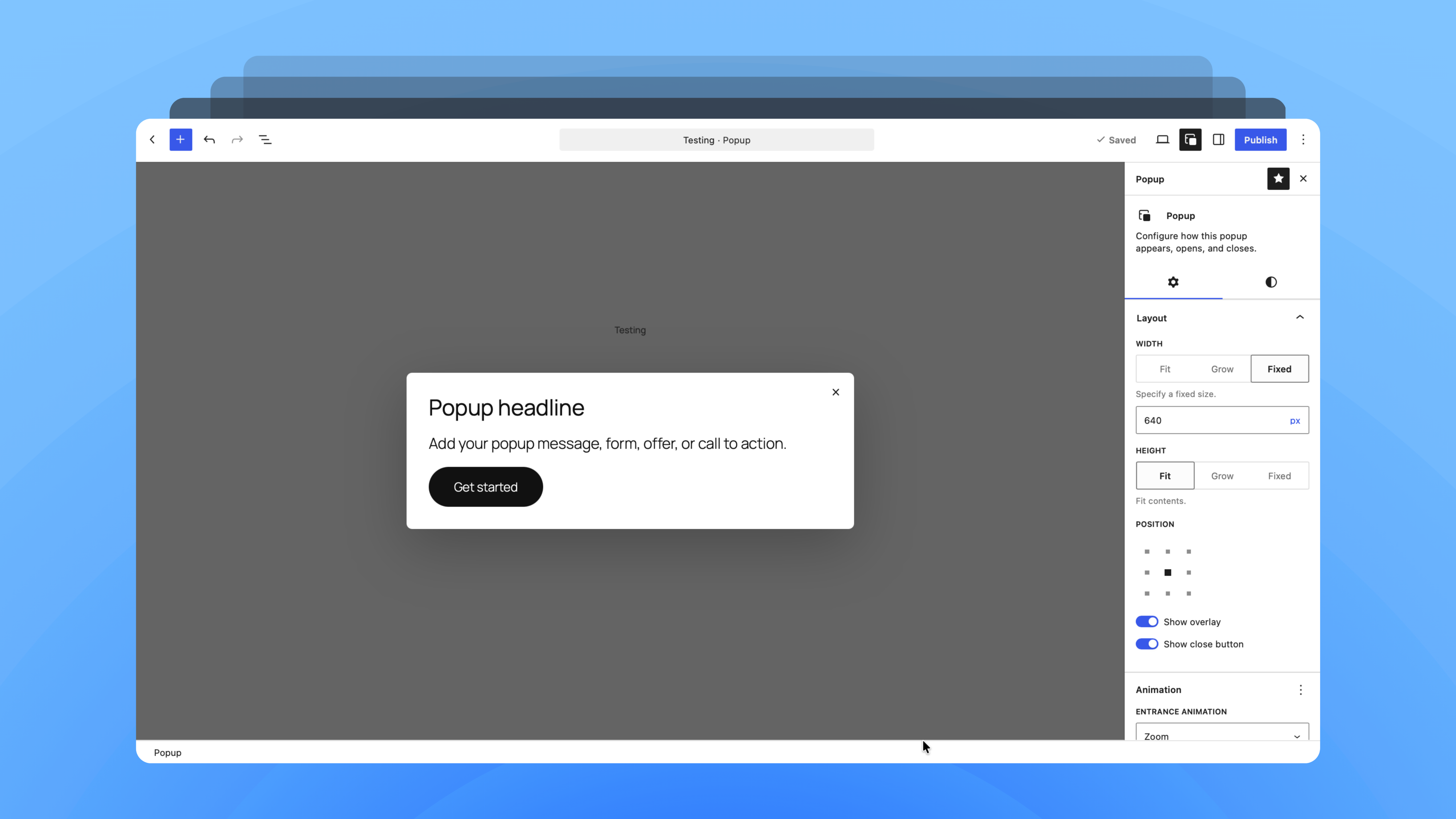


BlaBlaBlocks Popup: Building a Cleaner Popup Experience
Over the last few years, we have worked with different popup plugins across client websites.
They helped us solve the basic requirement, but we often ran into the same gaps. The editing experience was not always smooth, the UI could feel disconnected from WordPress, and design flexibility was sometimes limited unless we moved into a paid plan or worked around the plugin.
That experience became the starting point for BlaBlaBlocks Popup.
We wanted to build a popup plugin that feels more natural inside WordPress clean, familiar, and easy to customize. Something that follows the direction of the block editor instead of feeling like a separate tool added on top of it.
The plugin is being shaped around practical popup formats such as modals, slide-ins, floating bars, fullscreen popups, and small notifications. The focus is on giving users clear controls for design, display rules, and behavior without making the setup feel heavy.
We are also using newer WordPress capabilities like DataViews, DataForms, and the Interactivity API. DataViews supports list-based interfaces with layouts like table, grid, and list, along with search, filters, and sorting. DataForm helps edit structured items, while the Interactivity API gives WordPress a standard way to handle front-end interactions. Together, these tools help us build the popup experience closer to Core UI and UX.
BlaBlaBlocks Popup is still taking shape, but the direction is clear: a practical, open-source popup plugin built around cleaner workflows, better customization, and a more native WordPress experience.
Frappe Playground: running frappe in browser
One of the more unusual things we explored this month was running the Frappe Framework entirely inside the browser using WebAssembly (WASM), Pyodide, and SQLite.
The idea started with a simple question: if WordPress has Playground, why can’t Frappe have something similar?
After several experiments, dead ends, and plenty of browser debugging, we managed to get a working proof of concept. Frappe now boots entirely inside a browser tab, with no traditional server involved. The application runs client-side using Pyodide and WebAssembly, while SQLite handles the database layer. The entire playground is hosted as a static site on Cloudflare.
This is still highly experimental and far from production-ready, but it opens up some interesting possibilities. New users could explore Frappe without setting up a local environment. Developers could quickly test ideas. Teams could share reproducible demos and examples with a simple link.
Over the past few weeks, the team has been refining the architecture and understanding the limitations of running a framework like Frappe inside a browser. We are now working toward a more stable playground experience focused on quick onboarding and exploration of the Desk and no-code capabilities.
Sometimes the best projects begin as a curious experiment. This has been one of those.
Frappe Brewery: open app registry
Some projects start with a roadmap. Others start with a small annoyance.
While building Frappe Local, we realized that installing apps was not the difficult part. Discovering them, understanding what they do, and figuring out which version works with your Frappe setup often required a lot of manual digging.
What began as a simple script to collect app metadata from GitHub repositories quickly turned into something much larger.
That side project eventually became Frappe Brewery.
Frappe Brewery is an open app registry for the Frappe ecosystem. It brings together app listings, version information, categories, metadata, and APIs in a single place. The goal is to make discovering and evaluating Frappe apps easier for developers, consultants, and businesses exploring the ecosystem.
The project is fully open source and built around open data. Alongside the web interface, Brewery exposes JSON APIs that can be integrated into other tools and workflows. One of the first integrations is Frappe Local, where users can browse and install apps directly from within the desktop application.
Over the past few weeks, Brewery has evolved from an internal utility into a public community resource. We have now open-sourced the project and released it for the wider ecosystem, with community submissions and contributions already underway.
Sometimes the tools you need do not exist yet. So you build them.
Frappe Local: running frappe sites locally
Over the years, one thing has become very clear: getting started with Frappe can be harder than it should be.
For experienced developers, setting up a local environment is usually manageable. For beginners, consultants, students, and teams evaluating Frappe, the initial setup often becomes an unnecessary hurdle. Dependencies, Docker configurations, version compatibility, and troubleshooting can quickly turn a simple learning exercise into a frustrating experience.
As we worked on our own internal tooling, we kept coming back to the same question: what if getting started with Frappe felt as simple as installing a desktop app?
That question eventually led to Frappe Local.
Frappe Local is a cross-platform desktop application designed to simplify local Frappe development. It bundles the moving parts behind the scenes and provides a simpler way to create, manage, and experiment with Frappe sites. The goal is not to replace existing developer tools, but to make the framework more approachable for people who want to learn, explore apps, build custom solutions, or contribute to the ecosystem.
Over the past few months, the project has evolved from an internal utility into something we believe can help the wider community. There is still plenty of work ahead, but the direction feels promising.
Sometimes the best developer tools come from solving your own frustrations first. Frappe Local is one of those projects.
What We’re Learning and Applying
Each month, we take a step back and look at what’s happening around the industry and ecosystem, picking a few ideas and tools that we can learn from and bring into our own work.
A few things stood out this month:
- WordPress Client-Side Media (VIPS + WASM): Compresses and resizes images right in the user’s browser before uploading, drastically saving server resources.
- WooCommerce Dual API / GraphQL: A new experimental architecture where developers write plain PHP, and the system automatically generates a matching GraphQL API.
- Frappe Pilot: A next-generation, user-friendly tool to easily spin up and manage Frappe sites without wrestling with complex command-line setups.
- Frappe Customer Sync: A seamless native bridge that automatically shares customer data and support tickets between ERPNext and Frappe Helpdesk.
- OpenAI Jalapeño Chip: OpenAI’s first custom-built processor, designed with Broadcom specifically to make running AI models (inference) much faster and cheaper.